Best MIDI Keyboards for Beginners: Essential Features to Look For
Embarking on your musical journey with the right tools can transform an intimidating path into an exhilarating adventure. For newcomers to music production, the MIDI keyboard offers a gateway to the vast world of sounds and techniques, acting as both an instrument and a controller. Essential as your primary interface for inputting notes into digital audio workstations (DAWs), the MIDI keyboard can serve as the nucleus of your home studio. In this guide, we will delve into ideal options for those starting their musical composition ventures, focusing on features that cater to entry-level users while still offering room for growth.
Choosing the correct MIDI keyboard involves assessing several key aspects such as key count, weight and action type, connectivity options, and additional features like pads and controls. Moreover, beginners might not yet appreciate the subtle differences between various models and what these differences mean in practice. This article aims to simplify these complexities by highlighting the top MIDI keyboards tailored for beginners, ensuring your first step into music making is as informed and seamless as possible.
What to Expect in a Beginner MIDI Keyboard
Before diving into our list of recommended MIDI keyboards, it’s essential to understand why these particular models stand out. The options selected share features that are especially beneficial for beginners, including user-friendly interfaces, the presence of educational tools, and the versatility needed to explore different musical styles. These factors are crucial for sustained learning and enjoyment.
1. Akai Professional MPK Mini MK3
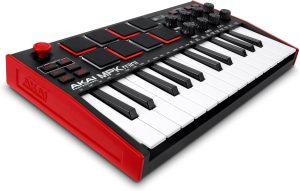
The Akai Professional MPK Mini MK3 is a favorite among beginners for many reasons. Its compact size makes it highly portable, yet it doesn’t compromise on functionality. This model includes 25 mini keys with redesigned keybed technology for improved responsiveness when playing. Additionally, the inclusion of 8 backlit velocity-sensitive pads provides ample opportunity for experimenting with beats and samples.
Key Benefits
- Compact and portable design perfect for small workspaces and on-the-go musicians.
- Integrated arpeggiator increases creative possibilities.
- Comprehensive software bundle, including Ableton Live Lite, to help beginners start making music right away.
- USB-powered, eliminating the need for a separate power source.
2. Novation Launchkey Mini [MK3]
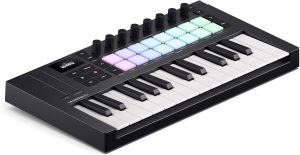
Beginners looking to harness the full power of Ableton Live should consider the Novation Launchkey Mini [MK3]. This MIDI controller is specifically designed to integrate seamlessly with Ableton, providing an intuitive and interactive experience that enhances workflow and music creation.
Key Benefits
- Deep and immediate integration with Ableton Live.
- 16 RGB drum pads for triggering clips and expressive drumming.
- Fixed chord mode enables new producers to build complex compositions without extensive musical theory knowledge.
Why People Choose It
Aside from the seamless integration with Ableton Live, this controller is also favored for its mobility and the creative freedom it offers through diverse controls like knobs, pads, and pitch/modulation touch strips.
3. Alesis V49
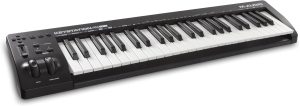
Those who prefer a larger keybed without sacrificing portability and budget should look at the Alesis V49. This model stands out with its 49 full-sized, velocity-sensitive keys, allowing for a more traditional playing experience that can be beneficial for beginner learning piano techniques.
Key Benefits
- 49 full-sized keys help bridge the gap between traditional pianos and modern MIDI controllers.
- Includes 8 velocity-sensitive backlit pads and 4 assignable knobs and buttons for an enhanced control surface.
- Educational software package included, ideal for beginners.
Performance
The Alesis V49 is not only about key count; its responsive keys and comprehensive controls make it an excellent option for beginners interested in both piano and production elements.
Expert Tips
To get the most out of your MIDI keyboard as a beginner, start by exploring all the included software. Many people underestimate the power of the software and focus only on the hardware. However, the included DAWs and plugins can be a treasure trove of educational resources. Experiment with different musical styles and don’t be afraid to tweak presets—it’s a fantastic way to learn how sounds are crafted.
Common Mistakes to Avoid
One common mistake is neglecting the maintenance of your MIDI keyboard. While MIDI controllers are generally low maintenance, occasional cleaning of the keys and knobs can extend their life and ensure they remain responsive. Additionally, avoid overloading yourself with features. Learn each feature of your MIDI keyboard thoroughly before moving on to the next to avoid feeling overwhelmed.
Frequently Asked Questions
Are weighted keys better for beginners?
Weighted keys can simulate the feel of an acoustic piano, which is beneficial if you’re learning traditional piano techniques. However, if your focus is more on beat-making or electronic music, semi-weighted or synth-action keys might be more appropriate.
Can I use a MIDI keyboard without a computer?
While a MIDI keyboard is designed to integrate with computer software, some models can be used as standalone instruments or with mobile devices. Check the specifications of the keyboard for MIDI OUT ports that can connect to other MIDI-compatible devices.
What’s the importance of USB MIDI versus traditional MIDI ports?
USB MIDI simplifies connections with computers and modern devices and is sufficient for most home studios. Traditional MIDI ports offer compatibility with older gear and greater flexibility for integrating with other hardware setups.
Do I need more than 25 keys?
If you plan to use your MIDI keyboard for playing complex musical pieces or learning piano, a larger keybed might be necessary. However, 25 keys are adequate for basic compositions and learning the basics.
What is a DAW, and do I need one?
A Digital Audio Workstation (DAW) is software used for recording, editing, and producing audio files. MIDI keyboards often come with a DAW, and learning to use it effectively is essential for music production.
Final Thoughts
Choosing the right MIDI keyboard is pivotal in ensuring a smooth and enjoyable introduction to music production. The models highlighted provide a range of options that adhere to different needs and learning curves. Remember, the best MIDI keyboard is one that aligns with your musical goals, learning style, and environment. Whichever model you choose, embrace the learning process and let your creativity flow!